|
UltimatData™
Database System
New Era in
Database Solutions
Edit Category, Sub-Category or Item
UltimateData™ provides you with an easy record edition options.
You may EDIT Category, Sub-Category or Item using two methods.
EDIT a Category, Sub-Category or Item
Method 1: Select the Category using Left
Mouse Click and then click on the 'Edit' button
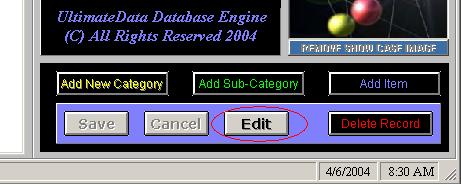
- - Select the Category,
Sub-Category or Item from the Tree using Left Mouse button.
- - Click on the 'Edit' button.
- Edit desired fields and Images
-
- You may EDIT the
'Showcase' image or any Gallery image.
-
-
Please Note: The program protect you from overriding your
image. If you try to select another image with the same name, the
program will not allow this operation!
-
-
-
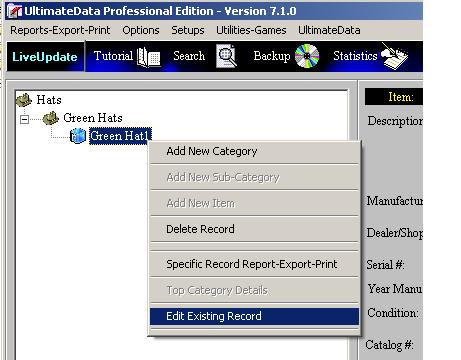
Method 2: Right Click on the Category,
Sub-Category or Item and using the
'Edit Existing Record' pull down menu option
-
-
-
- Right Click on a selected Category, Sub-Category or Item. A pull-down menu will
open.
- - Click on the:
'Edit Existing Record' menu option.
- EDIT the Desired fields and Images.
- You may EDIT the
'Showcase' image or any Gallery image.
-
-
Please Note: The program protect you from overriding your
image. If you try to select another image with the same name, the
program will not allow this operation!
-
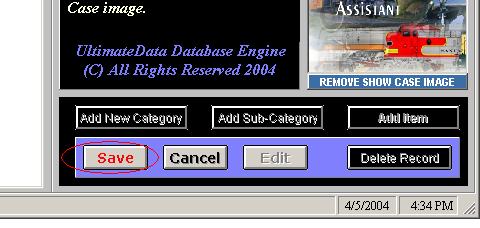
- To
Complete the Addition operation Click
- on the
flashing 'Save' button!
For
any questions please email us at: info@tayden.com

|
|
|