Main | Overview | Setups | Add | Edit | Delete | Search | Fields | Images | Reports-Export-Print | Statistics |  | Backup | Maintenance


UltimatData Database System

New Era in Database Solutions


Database Maintenance


       UltimateData™ is equipped with an advanced database maintenance system. In case of corrupted record, duplications or any other database issue you may use this system for database check and fix.

The reasons for database corruption are mainly due to a random 'glitch' or system crash. A random 'glitch' is very rare and can corrupt only the recent record. A system crash may lead to more major corruption which may require database restore.

Activating Database Maintenance System

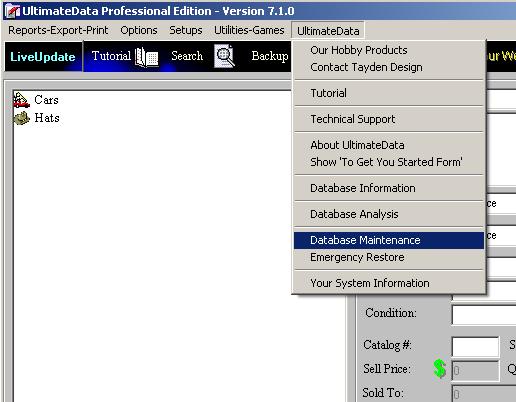
Select from  'UltimateData' menu the 'Database Maintenance' option.


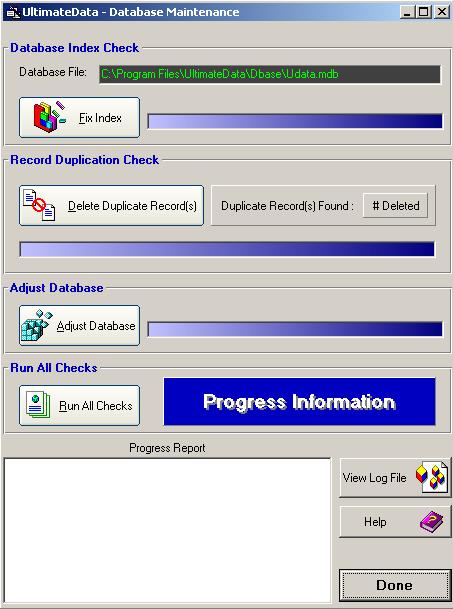
We recommend to run all checks! You may choose to run each check individually according to desire.

1. Database Index Check - This check will correct any discrepancies in the database index system. The indexing system is the key to the speed of accessing records.

2. Record Duplications Check - This check will detect and eliminate record duplications.

3. Adjust Database - This check will optimize the database in order to achieve fast performance.

The system generates a Text Based Log File for your convenience. Click on the 'View Log File' button to view/print the Log File.
For any questions please email us at: info@tayden.com     


 Tayden Design Web Site | Contact us